SMS Ride Alerts
Last updated: October 27, 2026
My-SafeRide, a school transportation service operated by ZEO BUSINESS LLC, sends text messages to parents who opt in, about their child's rides: pickups, drop-offs, delays, cancellations and safety alerts. No marketing messages are sent.
How parents opt in
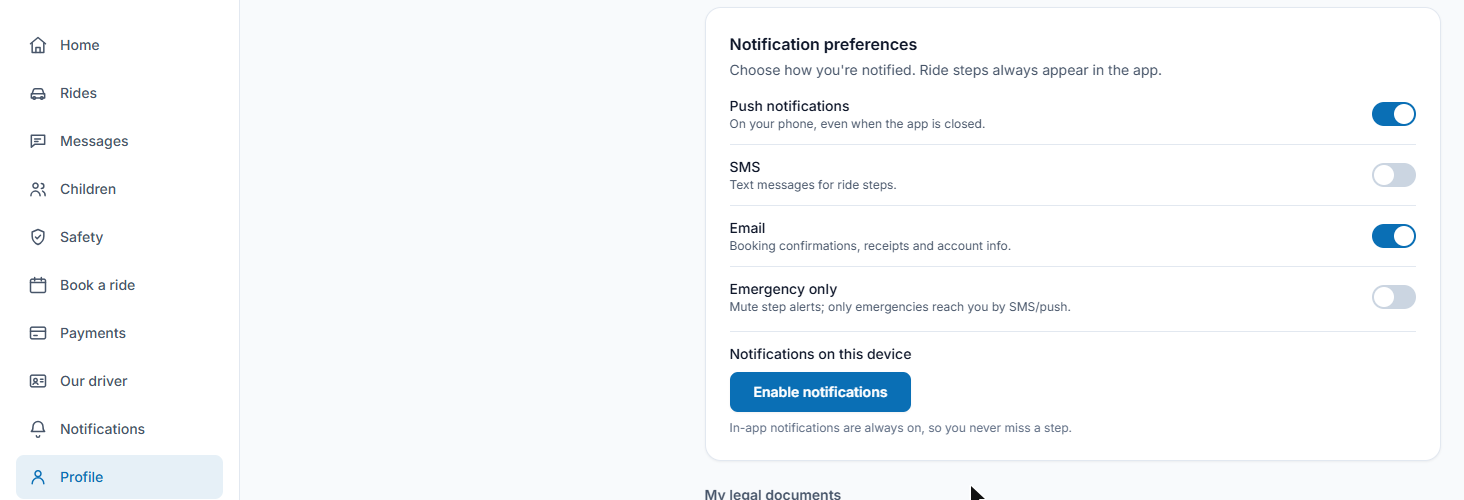
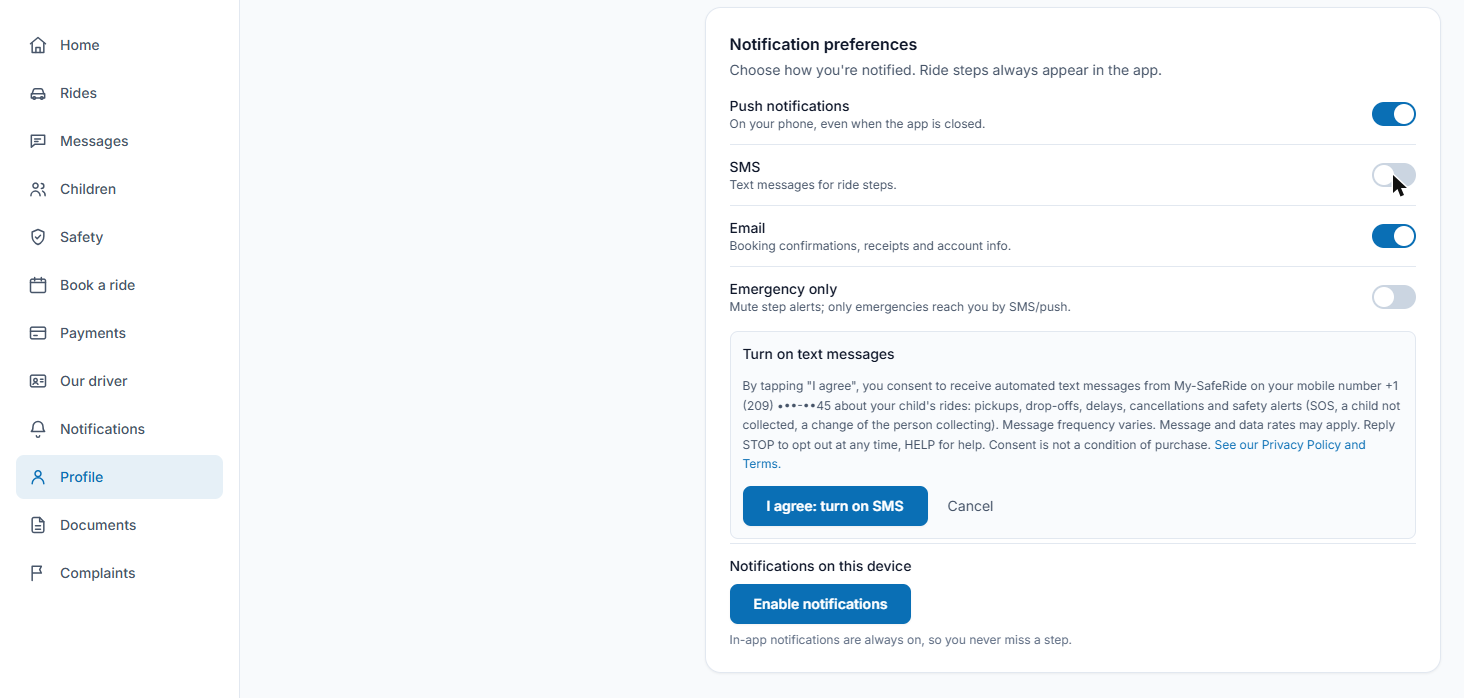
SMS is off by default. In the My-SafeRide app, a signed-in parent opens Profile → Notification preferences and switches on SMS. The app then shows the consent text below; SMS is enabled only after the parent taps "I agree: turn on SMS". Nothing is pre-checked. Text messages are optional: consent is not a condition of purchase, and parents who do not opt in can still book and pay, with every alert in the app and by email. A parent can opt out at any time (reply STOP or switch SMS off in the app). We record the date, the phone number and the version of the text accepted, and we send one confirmation text with HELP and STOP instructions.
Turn on text messages
By tapping "I agree", you consent to receive automated text messages from My-SafeRide on your mobile number (…) about your child's rides: pickups, drop-offs, delays, cancellations and safety alerts (SOS, a child not collected, a change of the person collecting). Message frequency varies. Message and data rates may apply. Reply STOP to opt out at any time, HELP for help. Consent is not a condition of purchase. See our Privacy Policy and Terms.
Copy of the in-app opt-in screen. It is also shown in Spanish to Spanish-speaking parents.
Screenshots of the opt-in (behind login)
The opt-in screen sits behind the parent's login. These are screenshots of the exact screens, taken in the My-SafeRide app (app.my-saferide.com).
- Profile → Notification preferences, SMS off by default:
- The consent text shown after switching SMS on; nothing is pre-checked and SMS is enabled only after "I agree: turn on SMS":
People authorized to collect a child
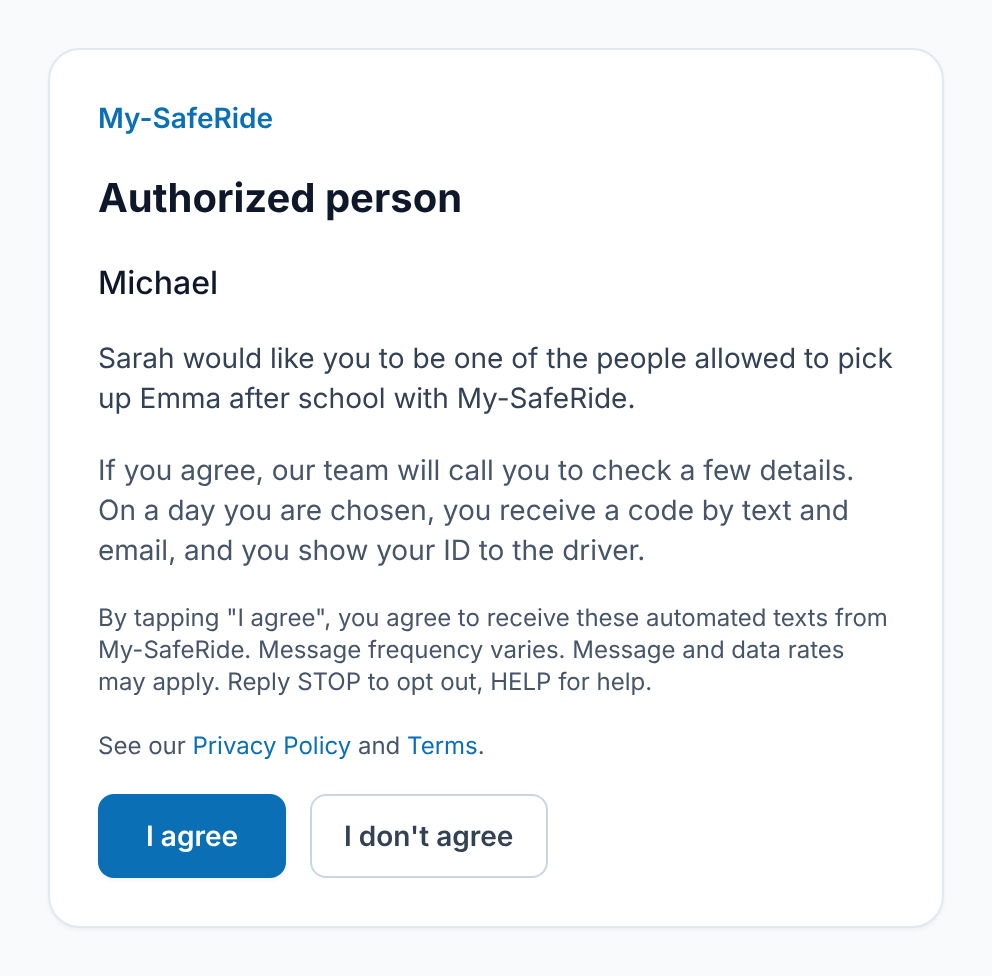
A parent can name another adult allowed to collect their child. That adult receives an email (never a text) with a link to a web page where they agree or decline. The page explains that, on a day they are chosen, they receive the one-time pickup code by text and email; message frequency varies, message and data rates may apply, and they can reply STOP to opt out or HELP for help. Under that text, the page links to our Privacy Policy and Terms. Pickup codes are texted only after they agree.
The link is personal, so that page cannot be opened without it. Here is a screenshot of the exact page, with the names replaced:
Who receives texts
We only text people who agreed to receive texts: parents who opted in, adults who agreed to collect a child, and our own staff. Emergency contacts named by a parent are never texted: they are told by email and reached by phone call. A parent joining the waiting list on this website may also tick an optional, unchecked box: "Also text me (SMS) from My-SafeRide about my request. Message frequency varies. Message and data rates may apply. Reply STOP to opt out, HELP for help. Consent is not a condition of purchase." The form links to our Privacy Policy and Terms.
Sample messages
- My-SafeRide: you're signed up for ride and safety alerts about your child. Msg frequency varies. Msg & data rates may apply. Reply HELP for help, STOP to opt out.
- My-SafeRide: your driver is on the way for Mon, Oct 27. Please secure your pets. Track live: (link)
- My-SafeRide: your verification code is 482915. It expires in 10 minutes.
Program details
- Message frequency varies with your child's rides.
- Message and data rates may apply.
- Reply STOP to opt out at any time. Reply HELP for help.
- Support: contact@my-saferide.com or +1 (510) 301-3584.
- Carriers are not liable for delayed or undelivered messages.
- No mobile information will be shared with third parties or affiliates for marketing or promotional purposes.
See our Privacy Policy and Terms of Service.